> ## Documentation Index
> Fetch the complete documentation index at: https://learn.getodin.ai/llms.txt
> Use this file to discover all available pages before exploring further.
# On-Premise Installation Guide
> Requirements for installing the Odin AI platform in your environment.
This document outlines the pre-deployment prerequisites, verification steps, and considerations required for the successful on-premises installation and deployment of the EKB product. It is intended to serve as a comprehensive checklist to ensure that the client’s environment is properly configured and meets all necessary requirements before proceeding with the deployment.
## Prerequisites
### Access Requirements
* **Server Access:**
* Confirm access to deployment servers with sudo privileges.
* Verify that all necessary network routes are established via a secure VPN or dedicated network configuration.
* **User Permissions:**
* Ensure that the deployment team has been granted the necessary access rights.
* Validate that any required two-factor authentication (2FA) or security tokens are in place.
### System Requirements
**Operating System:** \
Ubuntu 22 or RHEL 8.10
**Hardware Specifications:** \
For each deployment tier, ensure that the hardware meets or exceeds the following:
| Tier | Cores | RAM (GB) | SSD |
| :--------- | :----- | :------- | :----- |
| **SMALL** | 16 | 64 | 1TB |
| **MEDIUM** | 32 | 128 | 2TB |
| **LARGE** | Custom | Custom | Custom |
* **GPU** (Required when deploying an LLM on the same machine as the Odin AI platform.)
* **SMALL:** \~500 (100 Concurrent) users can be supported by a single VM 16 cores, 64gb ram, 1 TB
* SSD these machines cost \~\$600 per month. This is a minimum size deployment.
* **MEDIUM** \~ 2000 (500 Concurrent) users can be supported by a larger machine 32 cores, 128gb ram, 2 TB
* SSD these machines are around \~\$1,200 per month
* **LARGE:** \~10000 (1000+ Concurrent) users should be deployed across containers so that the infrastructure
* can scale to support the needs, this typically costs a minimum of \$2,000 per month it is
* suggested to calculate \$2,000 per month per additional 1,000 Active Users. This is a fully
distributed deployment.
### Deployment Tools & Software Dependencies
* **Deployment Scripts:**
* Verified and version-controlled Bash deployment scripts.
* **Dependency Management Tools:**
* Python 3
* Git (current version)
* Docker (v27.1.1) or Podman
* **Additional Tools (Optional):**
* Logging and monitoring tools (e.g., ELK Stack, Prometheus, Grafana) as per the client’s monitoring requirements.
### Credentials and Keys
* **Server Credentials:**
* Ensure that all server access credentials are up to date and securely stored.
* **Application API Keys and Licenses:**
* Verify that all application-specific API keys and licenses (e.g., OpenAI, SERP, Sentry) are available and valid.
## Pre-Deployment Checklist
### **Hardware and System Verification**
Ensure that the client’s hardware and system configurations match the specifications:
```
# Check CPU Information
lscpu # Works on both Ubuntu and RHEL
cat /proc/cpuinfo # More detailed CPU information
# Check Memory Usage
free -h # Human-readable format for memory usage
cat /proc/meminfo # Detailed memory information
# Check Storage Usage
df -h # Displays disk usage
lsblk # Lists block devices and partitions
```
#### **3.2 Software and Dependency Verification**
Verify that all necessary software components are installed and correctly versioned:
````
# Check Docker Version
docker --version # Applicable for both Ubuntu and RHEL
# Check Docker Compose Version
docker compose version # For modern Docker setups
docker-compose --version # For older installations
```
# Check Python Version
python3 --version # Preferred check for Python 3
python --version # Alternative if python3 is not available
# Check Git Version
git --version # Valid for both Ubuntu and RHEL
````
#### **3.3 Network and Connectivity Check**
Ensure the network is correctly configured and that there is adequate internet connectivity for external dependencies or updates:
```
# Check Internet Connection Availability
ping -c 4 google.com # Ping Google to verify network connectivity
curl -Is https://www.google.com | head -n 1 # Alternative check using curl
```
#### **3.4 Additional Verifications**
Ports that must be open:
**Services and ports**
| Service | Path | Parameter | Internal ports | External ports |
| :------------------------ | :--------- | :---------------- | :------------- | :----------------------------------- |
| Frontend | / | FRONTEND\_SUFFIX | 3000 | — |
| Nginx | / | — | — | 80, 443 |
| Backend | /backend | BACKEND\_SUFFIX | 8001 | — |
| Automator | /automator | AUTOMATOR\_SUFFIX | 8002 | — |
| Redis | — | — | 6379 | — |
| RabbitMQ | — | — | 5672, 15672 | — |
| Supabase Kong API Gateway | /supabase | SUPABASE\_SUFFIX | 8000, 8443 | 8000, 8443 (admin only) |
| Supabase Postgres | — | — | 6543 | — |
| PostgreSQL (automator) | — | — | 5433 | — |
| Redis (automator) | — | — | 6380 | — |
| Ollama | — | — | 11434 | — (only if deploying Ollama locally) |
**Protocol support**
| Service | HTTP | HTTPS | WebSocket |
| :------------------------ | :--- | :---- | :-------- |
| Frontend | ✓ | ✓ | — |
| Nginx | ✓ | ✓ | — |
| Backend | ✓ | ✓ | — |
| Automator | ✓ | ✓ | — |
| Redis | ✓ | ✓ | — |
| RabbitMQ | ✓ | ✓ | — |
| Supabase Kong API Gateway | ✓ | ✓ | ✓ |
| Supabase Postgres | ✓ | ✓ | — |
| PostgreSQL (automator) | ✓ | ✓ | — |
| Redis (automator) | ✓ | ✓ | — |
| Ollama | ✓ | ✓ | — |
> **Notes:** All internal machines must be able to communicate freely with each other. We recommend using SSL (HTTPS) connections; HTTP is supported during PoCs.
**Firewall and Security Settings:**
Validate that firewall rules or security groups allow for required traffic.
## General Architecture
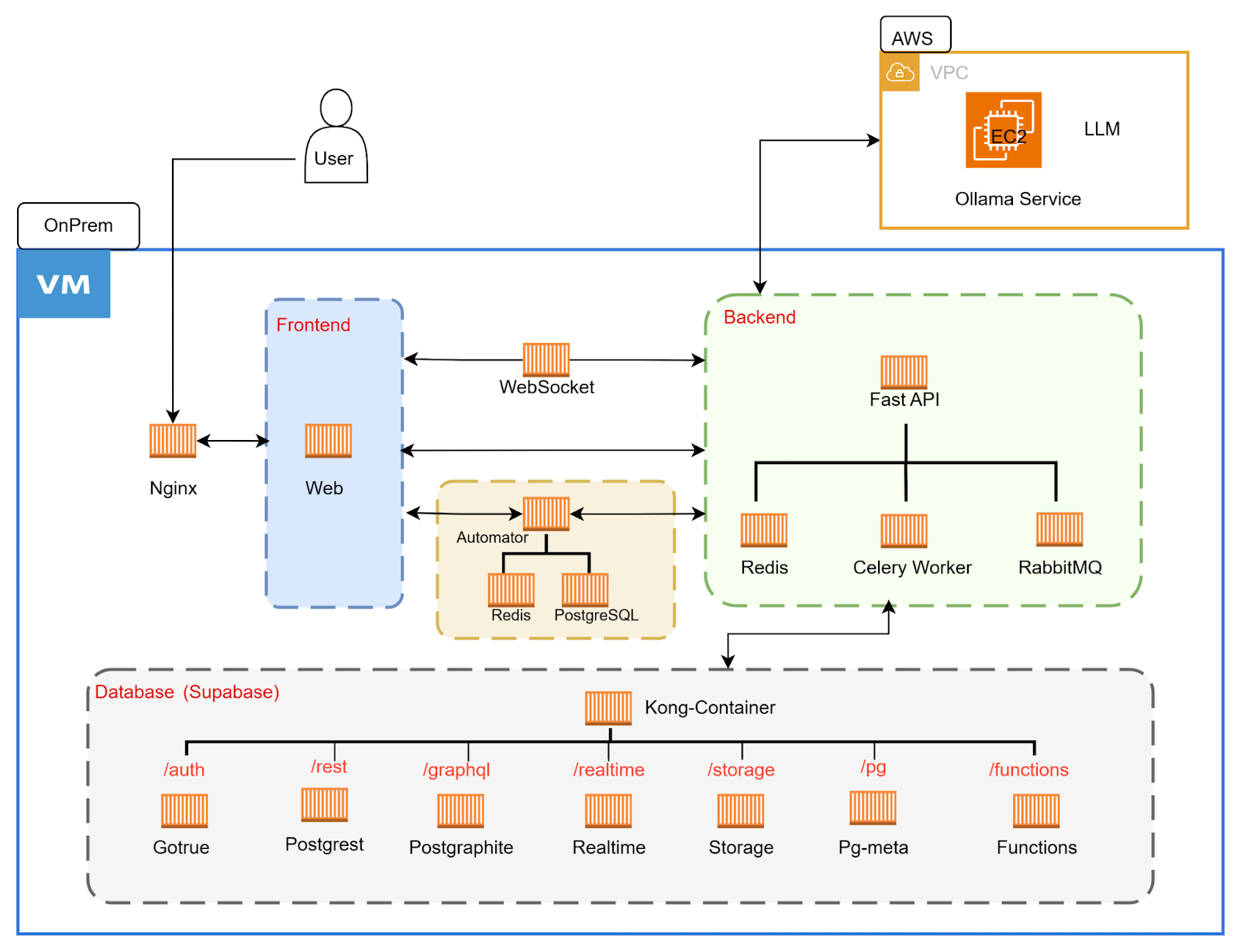
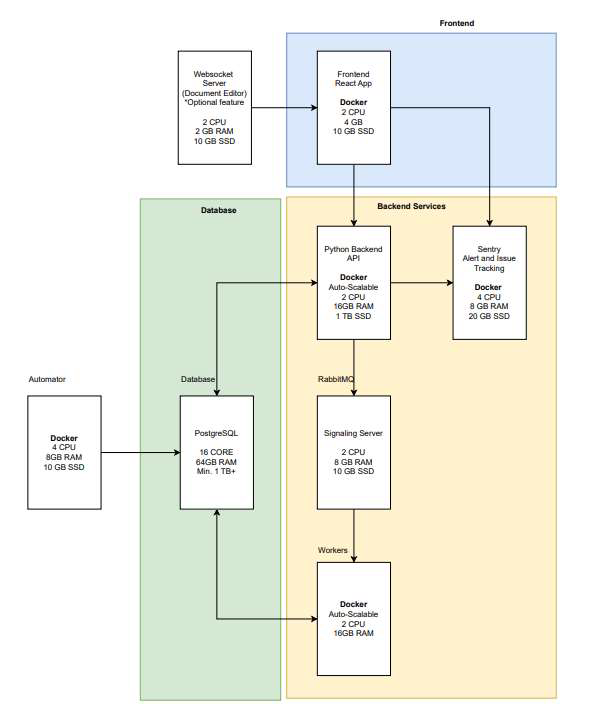 ### Architecture Diagram – OnPrem
Deployment architecture flow for single virtual machine box with mentioned prerequisite resource allocation
### Architecture Diagram – OnPrem
Deployment architecture flow for single virtual machine box with mentioned prerequisite resource allocation
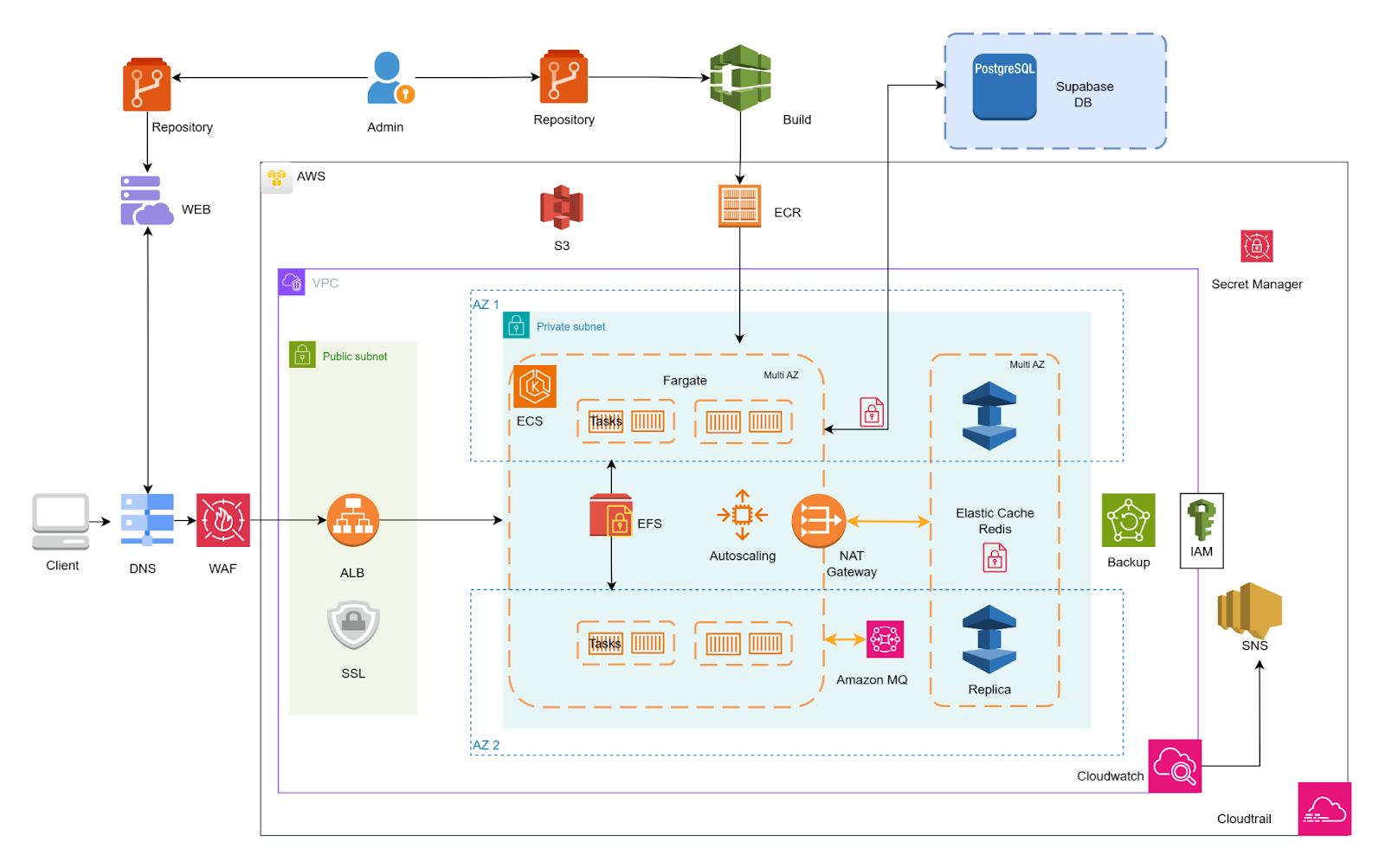
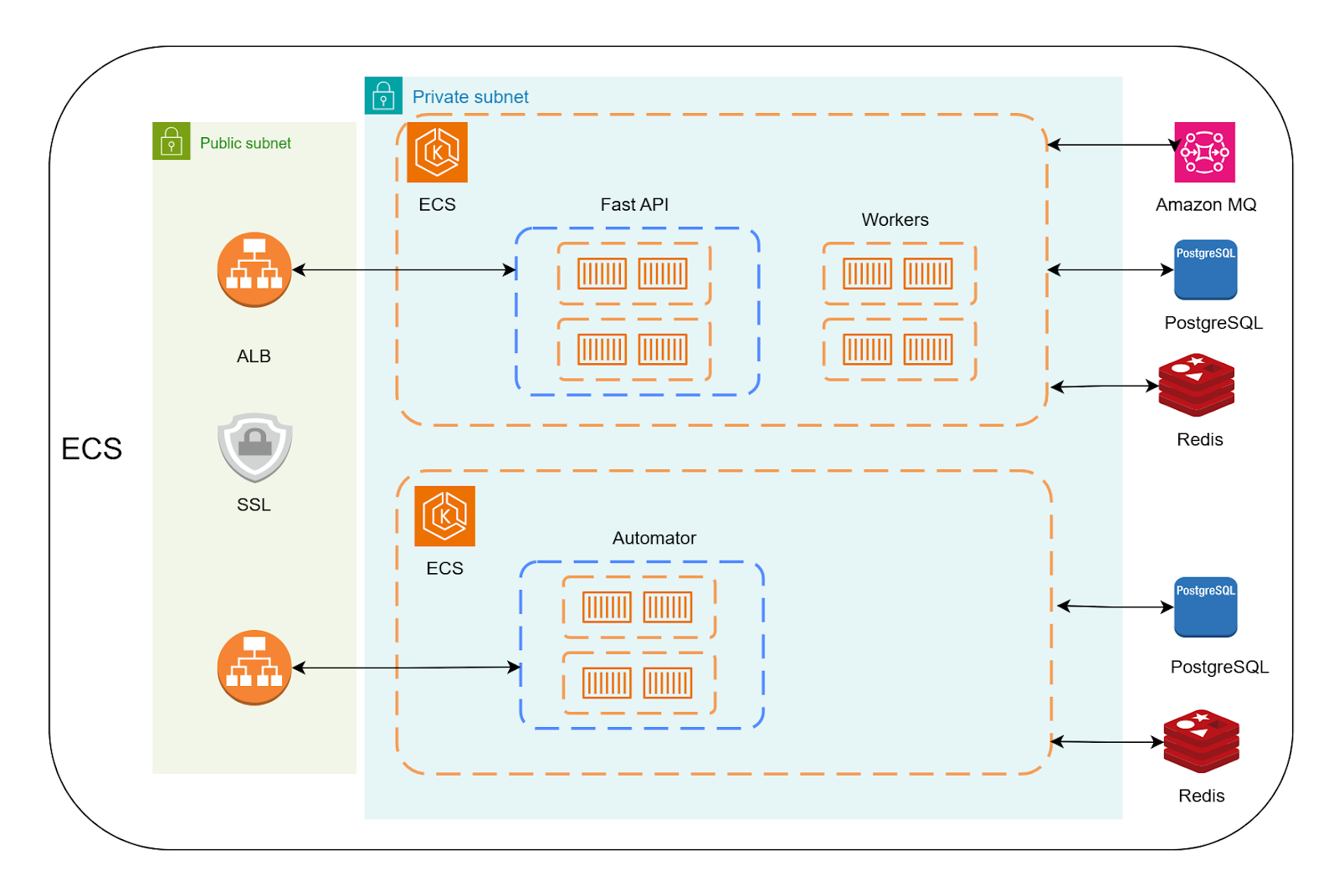
 ### Deployment architecture flow for AWS Cloud deployment