

Configuration
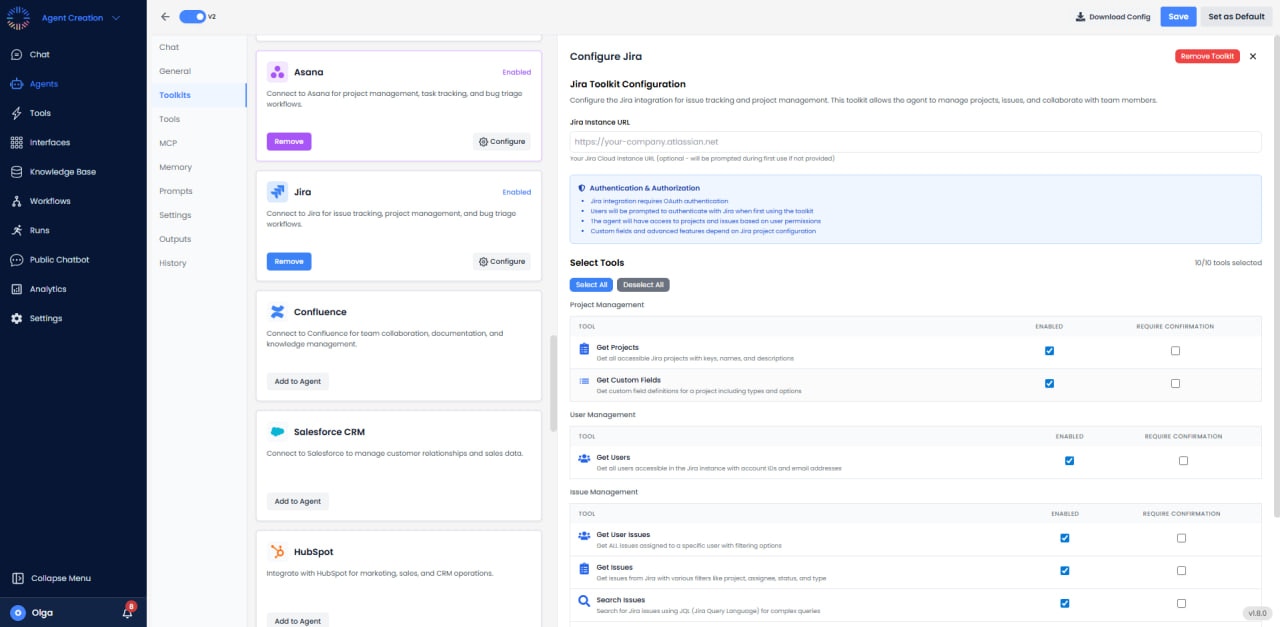

- Instance URL: https://your-company.atlassian.net (optional; will be prompted during first use if not provided)
- Authentication: OAuth
- Access: Manage issues, projects, and workflows
Available Tools (10/10)
- Get Projects: Get all projects accessible to users.
- Get Custom Fields: Retrieve custom field definitions.
- Get Users: Find users by name or email for assignment.
- Get User Issues: Retrieve issues assigned to specific users.
- Get Issues: Query issues by project or filters.
- Search Issues: Execute JQL searches with full syntax support.
- Get Issue Details: Retrieve complete issue information.
- Create Issue: Create new issues with summary, description, and type.
- Update Issue: Modify issue fields and properties.
- Delete Issue: Remove issues from projects.
Use Cases
- Bug Tracking: Automatically create Jira issues from error logs or alerts.
- Sprint Management: Manage agile sprints and issue assignment.
- Issue Automation: Auto-transition issues based on external events.
- Integration Bridge: Sync issues between Jira and other tools.
- Release Management: Track release progress and deployments.